Free · Windows · nothing leaves your computer

Know exactly
where you stand.

DuePilot reads your classes and tells you the thing your school makes weirdly hard to find: your real grade in every class, what each assignment is actually worth, and what you need on what's left.

Free. No account, no card, no upload. Works in about 30 seconds.
DuePilot showing a week of assignments, what needs attention, and the order to do them in
Your actual week. Sorted by what's due, then by what it's worth.
What it does

Three things, properly.

Not another to-do list. The point is the maths your school already did and then buried.

Your real grade

Every class, the weighted number, the letter, and the breakdown by category. Plus the one students actually want: what do I need on the final to finish with an A?

What to do next

Everything due, ranked by deadline first and then by how much of your grade it's worth — so a 2% discussion post never outranks the exam worth 20%.

Notes while you sleep

Study guides and flashcards, written overnight from your actual course material. Then it drills you with practice problems, marks your answers, and shows you exactly which idea tripped you up and how to get it right next time.

One button

Press it once. Everything fills in.

Process my week signs into your school, pulls every class, every deadline and every grade, reads the attached material, and writes your notes. Then it keeps doing it every half hour on its own.

  • One sign-in. The normal one, on your school's own page. Duo and all.
  • It finds everything. Assignments, quizzes, discussions, due dates, weights, rubrics, attached readings.
  • Then it keeps up. Re-checks every 30 minutes, so the week is already right when you open it.
  • Your notes are waiting. Written overnight, before you sit down.
Every class with its real weighted grade, letter, trend and GPA estimate
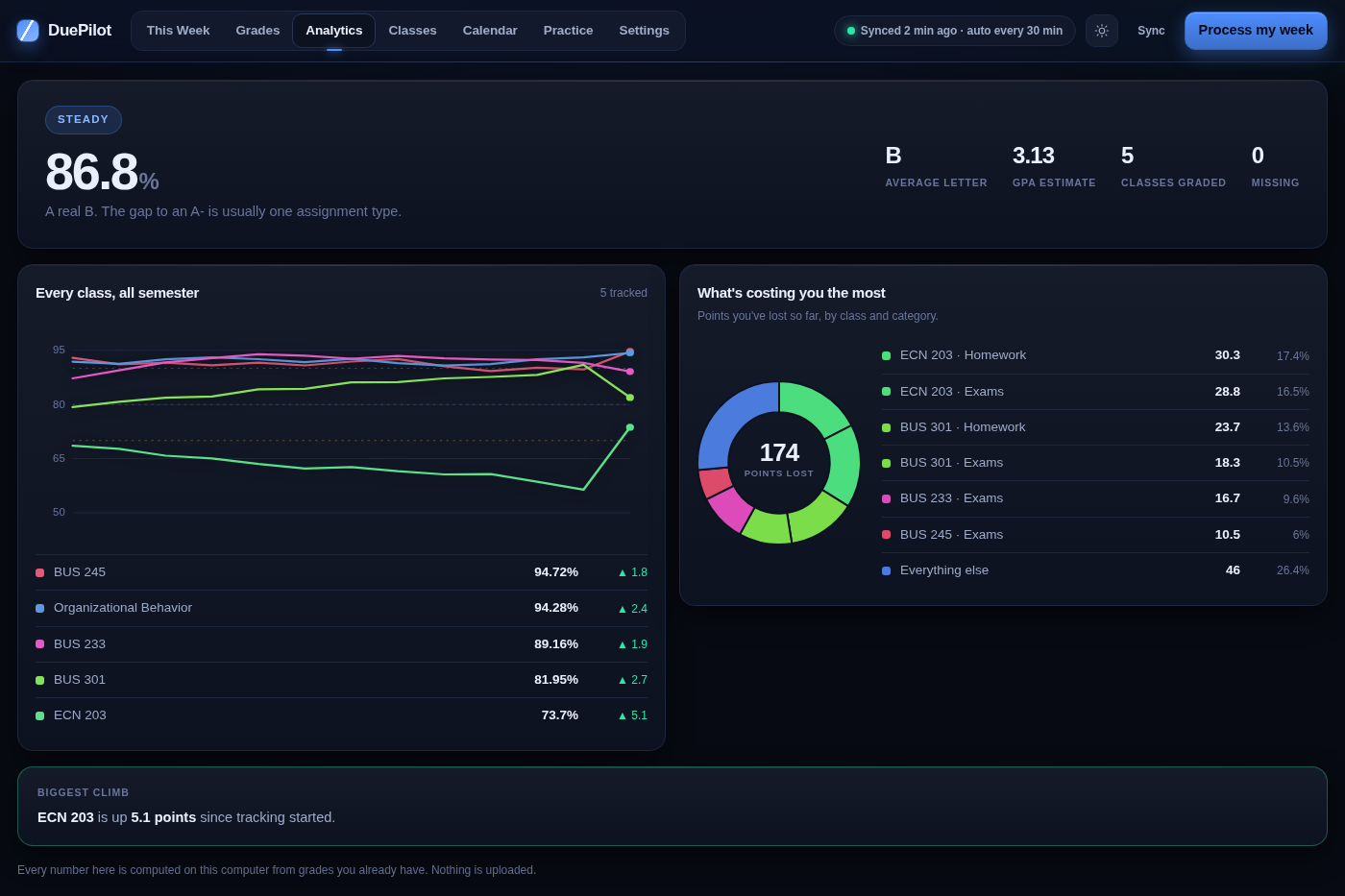
A semester of grades charted per class, with a breakdown of where points are being lost
Analytics

See your whole semester at once.

Every class plotted week by week, your GPA estimate, and a breakdown of exactly which class and which category is costing you the most points.

  • The whole term in one line per class. Watch a grade climb, or catch it sliding early.
  • Where the points went. "ECN 203 · Homework — 30 points" tells you what to fix.
  • Your standing. Average, letter and GPA estimate across everything.
  • Biggest climb, biggest drop. The two classes worth your attention this week.
Works with
Canvas Blackboard Brightspace / D2L Schoology Google Classroom Moodle PowerSchool Infinite Campus Blackbaud Sakai itslearning

Dimmed ones sync your due dates through their calendar feed.

Privacy

Your grades never leave your computer.

There's no DuePilot account, no cloud database of your transcript, nothing uploaded. Your classes, grades and notes live in a file on your own machine, and the maths runs there too. Your school password is never stored — when you connect, you sign in on your school's own page, exactly as you always do.

Pricing

The useful part is free.

Grades, deadlines and projections cost nothing and always will — they run on your computer, so they cost us nothing either. You only pay for the AI that teaches you.

Free
$0 forever
  • Every class, every deadline
  • Real grade in each class, weighted
  • What you need on the final
  • What each assignment is worth
  • Calendar, planner, grade report
  • No account. No card. No limits.
DuePilot Plus
$5.99 a month
Cancel any time. Free for 7 days.
  • Everything in Free
  • Study guides and flashcards for every class
  • Practice problems written for your material
  • Marked answers that explain your mistakes
  • Tracks the concepts you keep getting wrong
  • Ask anything about your readings
For schools

Licence it for your whole campus.

One price for the school year, every student included. Built to teach the material and prove it — students work the practice problems themselves, and the app shows them where their understanding breaks down. Your academic-integrity office will want to see how it's built; we'll show them.

Talk to us about a school licence

Takes about 30 seconds.

Download it, open it, click your school. That's the whole setup.

Windows 10 and 11 · about 40 MB · free, no account needed

Windows may ask you to confirm the first time you open it, because DuePilot is new and not many people have downloaded it yet. Click More info → Run anyway.

Questions

The honest answers.

Do you see my grades?

No. There's no DuePilot server holding your data and no account to make. Everything lives in a file on your computer and the calculations run there. We genuinely can't see it.

Do I have to give you my school password?

Never. If you choose to connect your school, a window opens on your school's own sign-in page — the same one you always use, Duo and all. Your password stays between you and your school.

How much setup is there?

One sign-in, then press Process my week. It pulls your classes, deadlines, grades and the attached reading, works out what everything is worth, and writes your notes. After that it refreshes itself every half hour, so the week is already correct when you open it.

Is the AI part required?

Grades, deadlines and projections are plain arithmetic on your own machine, so they work with or without it. The AI is what writes your study guides, notes and practice problems.

What does it change in my school account?

Nothing — DuePilot only reads. It's built to be read-only, and an automated test enforces that on every single build.

Mac or phone?

Windows today, and you can open it from your phone over the same wifi. Mac is on the list — email us and we'll tell you the moment it lands.